
Bye bye blue box
For some time now my pi-star node was in a fairly large blue box. Originaly this box had three Pi systems plus a 5V PSU but over the months two of those systems were either shut down or relocated to their own 3D printed box and powered via a PoE HAT. So the blue box, measuring some 240x110x190mm was pretty much empty.
Since I built a M17 hotspot out of a Pi and a Nextion screen I found a 3D printable box specifically for the 3.2" Nextion. So I printed this and a second one for pi-star.
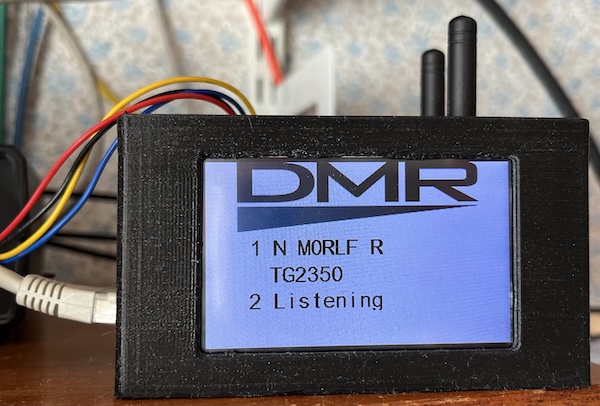
This has saved quite a bit of shelf space. The case is not fully ideal because in the case of the pi-star node the Nextion is connected via a USB to TTL converter which sticks outside the case. The M17 node has a Zumspot USB radio which again sticks out the side. But it will make a good basis for designing a wider box that will encompass the USB bits.
You should also read:
SD card blues
I thought I was going mad today. I wanted to print some rails for the FT817 and I already had the sliced files on the SD card in the 3D printer. I selected the first (there are two, one is a mirror of the other) and told it to print. Nothing. Reset the printer and tried again. Nothing. Opening the SD card on the Mac showed the file to be 0 bytes, which is certainly was not as I had printed it before. Ok, copy it again and try again. Nothing! Right. Delete all the files on the SD card - I have them all on the Mac anyway. Copy just the files for the rails across and try again. Nothing! Looking at the SD card via a terminal window - I must admit to be my favourite UI - it was full of all sorts of junk. Going duff perhaps? Ok, use a recycled 8Gb micro-SD in a holder, delete all the files currently on it, copy the rails across and try that. Ah, the files did not delete so it's full of old junk and I can't spot the files to print. Back to the Mac. Tried 3 times with different holders to delete all the files on this micro-SD and each time unmounting and re-mounting it showed they were all still there. That micro-SD is in the bin now. Right! Use another micro-SD, delete all the old files, copy just the two gcode files across and .... it's printing! Wow.
Continue reading...Printing blues
Recently our ageing HP 1022 printer has been misleading paper. There is a solenoid on the righthand side which controls the feed and the associated spring gets weak. I have stretched it three times so far, each time curing the issue for a while. A new spring is needed and, of course although I have a number of these they are all safely stored in the workshop never to be found! Coupled to the desire to print in colour and on reasonably thick paper - I'm thinking short ranges of 'special' QSL cards here - after a bit of research I chose a Xerox printer. Reasonable cost and - although as is typical with these things new toner costs more than the printer - aftermarket toner is affordable. The printer duly arrived and I set up the networking and it tried a test print. This failed to eject all the way and the printer announced it had a paper jam. Ok... try again. Nope. If I eased the sheet out as it was printing all was fine, but it never managed by itself. I did the usual things. Swearing at the printer failed to cure the issue as I had hoped. DuckDuckGo'ing for answers threw up other people with the same issue but none of their cures worked for me. But it's now, so off to the supplier who helpfully told me the contact number for Xerox. I had already registered the printer via Xerox's own mechanism so all would be fine. Nope. After being cut off the first time I spoke to someone who said that although they could see that I had registered the printer their internal systems did not realise and I could not be connected to technical support. I needed to send a proof of purchase, which I did. Some hours later I had a reply that they cannot work with said proof and needed a sales invoice. But it's a private sale - I mean, who these days buys something via the web using PayPal and expects a sales invoice? You get a receipt for payment, then a message about what you are buying, a despatch note etc. I've not seen a sales invoice since I retired. Anyway, I sent everything I had and have yet to receive a reply that I am allowed to contact their technical people about their printer which arrived faulty. Meanwhile I found the fix on the web using more flowery search terms and the printer now works fine. Good grief.
Continue reading...Creed blues...
Having been unable to find any documentation at all for the CT100 TU I made a better effort at tracing the circuit out and I now think I know what connects to where. The magnet output is obvious, as is the audio input (TX output). I have now worked out the audio output (RX input) and traced enough of the circuit to figure out the keyboard input which has three connections for mark, space and tongue, the latter being connected to earth. The mark and space inputs pull down the inputs to matching nand gates and thence into the rest of the circuit. The keyboard connections were the last bit of information needed. Attaching headphones to the audio output I can trigger both tones by shorting each of the mark and space inputs. So far, so good. But... ...the keyboard outputs from the 75 are open circuit, yet at rest the 'stop' contact should be made and thus one of the keyboard connections should be connected to it. it isn't. A slight pressure on the contact makes it. Similarly, each of the 5 code contacts never 'makes' when operated (i.e. pressing a key and turning the motor by hand). But those code contacts are quite a long way off and I don't want to adjust them until I read up on that part of the mechanism. Amazon just delivered a set of feeler gauges (my set from motorsport days are very rusty!) and spring balances so I can begin to work through the adjustments. My general experience of teleprinters dates back to when I was still at school and all Creed 7E's... the 75 is quite different.
Continue reading...